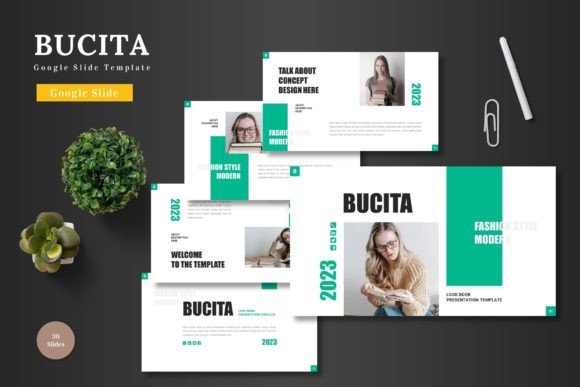
Bucita Google Slide Template: Your All-in-One Presentation Toolkit
Creating a professional presentation can often feel like a daunting task. Between designing layouts, crafting visuals, and ensuring everything looks cohesive, the process consumes valuable time and energy. This is where a well-designed template becomes a game-changer. The Bucita - Google Slide Template emerges as a comprehensive solution, offering a clean, scalable, and colorful foundation for anyone needing to communicate ideas effectively.
What Exactly Is the Bucita Template?
At its core, Bucita - Google Slide Template is a pre-designed set of slides created for use within Google Slides. It’s not just a single slide or a basic theme; it’s a full-fledged toolkit comprising 150 total slides, thoughtfully organized across 5 different premade color schemes. Each color variation contains 30 slides, providing extensive variety and flexibility right from the start. The template is built entirely within the Google Slides environment, meaning every element—from shapes to text boxes to infographics—is editable directly within the software. There’s no need to switch to another design program, making it accessible to a wide range of users.
Core Features and Practical Benefits
The value of Bucita - Google Slide Template lies in its detailed feature set, which translates directly into practical benefits for the user.
Comprehensive and Organized Content
- 150 Total Slides: This vast library offers slides for every conceivable part of a presentation: title slides, section breaks, content layouts, galleries, portfolios, and conclusions.
- 5 Premade Color Variations: With 30 slides per color scheme, you can instantly change the entire aesthetic of your presentation to suit your brand or topic mood.
- Handcrafted Infographics: The template includes premade, editable infographics based on master slides. This allows you to visually represent data, processes, or statistics without building charts from scratch.
Effortless Customization
A key promise of the Bucita template is its ease of editing. All graphics are resizable and editable as Google Slides shapes. You can change colors, resize elements without quality loss, and manipulate them freely. The inclusion of picture placeholder areas means you can drag and drop your own images directly into the framework, ensuring perfect alignment and proportion. This "edit-only-on-Google-Slides" philosophy removes technical barriers.
Professional Polish and Functionality
- Pixel-Perfect Illustrations: The visual elements are designed with precision, giving your final presentation a high-quality, professional look.
- Animated Slide Included: Dynamic elements can help engage an audience, and having a pre-animated slide within the set saves you from learning complex animation tools.
- Gallery and Portfolio Slides: Dedicated layouts for showcasing products, team members, or project case studies are invaluable for specific presentation types.
Who Can Benefit from Using Bucita?
The multipurpose nature of Bucita - Google Slide Template makes it suitable for a diverse audience. Its application spans professional, educational, and personal projects.
Business Professionals and Entrepreneurs
For creating pitch decks to investors, quarterly business reviews, internal strategy presentations, or promotional material for e-commerce products, the template provides a structured, credible starting point. The time saved on design allows a focus on refining the message and data.
Creators, Educators, and Freelancers
Individuals who need to present portfolios, online course content, workshop materials, or client proposals will find the gallery slides and clean layouts particularly useful. It helps maintain a consistent personal or brand aesthetic across different projects.
General Users and Students
Even for a less frequent presenter, having a robust template like Bucita can elevate a simple school project, community group update, or personal presentation. It demystifies the design process and guarantees a visually coherent outcome.
Real-World Applications and Scenarios
Imagine a small business owner preparing for a local networking event. Instead of spending hours on slide design, they open the Bucita template, choose a color scheme that matches their logo, input their company bio into the provided text areas, drag and drop product photos into the gallery placeholder, and use an infographic slide to highlight their growth metrics. Within an hour, they have a polished, animated presentation ready.
Consider a marketing manager needing to present a new campaign strategy to the team. They can use the section break slides to clearly divide the presentation into phases, employ the portfolio slides to showcase previous successful campaigns as examples, and tailor the infographics to display projected engagement data. The template’s structure guides the narrative flow.
Evaluating Suitability for Your Needs
While Bucita - Google Slide Template offers extensive features, it's wise to consider your specific requirements.
Strengths to Leverage
- Time Efficiency: It drastically cuts down the initial design and layout phase.
- Visual Consistency: The master-slide-based design ensures fonts, spacing, and colors remain uniform.
- Accessibility: Being entirely operable within Google Slides makes it platform-friendly and collaborative.
- Scalability: From a 5-slide quick talk to a 50-slide detailed report, the template can support it.
Practical Considerations
The template provides the framework, but the content quality and narrative still depend on you. It requires familiarity with basic Google Slides operations like editing text, replacing images, and perhaps changing colors. While it includes 5 color schemes, if you need a highly specific, custom color palette outside those options, you will need to manually edit each element’s color, which is possible but requires more effort. Also, remember that the included animated slide is a pre-made example; for extensive custom animation, you’d need to build upon it using Google Slides’ animation tools.
A Template Designed for Real Presentation Needs
Ultimately, the Bucita - Google Slide Template stands out not just as a collection of slides, but as a thoughtfully constructed presentation system. It balances generous quantity (150 slides) with organized quality (5 color themes, master slides). Its promise of editing solely within Google Slides holds significant appeal for users who prefer a unified, cloud-based workflow. By handling the fundamental design burdens, it empowers you to concentrate on what matters most: crafting a compelling message and presenting your slides to the world. Whether for business, education, promotion, or personal use, it serves as a reliable, adaptable foundation, helping you maintain a high standard for your visual communications with efficiency and ease.