Alosa Keynote Template: A Flexible Tool for Modern Presentations
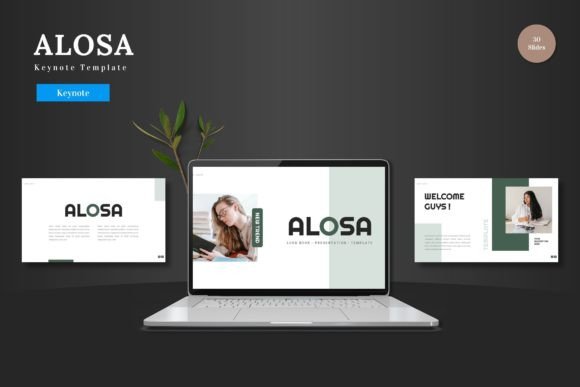
In a world where communication is visual and speed is essential, having a reliable presentation template can transform how you share ideas. The Alosa Keynote Template is a comprehensive collection of slides designed for Apple's Keynote software. It’s built as a clean, scalable, and colorful framework, ready for you to populate with your own content. Unlike generic templates, it focuses on being a complete toolkit, offering 150 total slides across five distinct color variations, handcrafted infographics, and pixel-perfect illustrations. The core promise is that everything is editable directly within Keynote—from shapes to colors to image placeholders—without requiring additional software or advanced design skills.
Why a Template Matters More Than You Think
A presentation template isn't just about aesthetics; it's a productivity engine and a confidence booster. For a busy entrepreneur pitching to investors, it saves precious hours. For an educator explaining a complex concept, it provides a clear visual structure. The value of a tool like Alosa Keynote Template shifts dramatically depending on who is using it and what they aim to achieve.
A marketer might prioritize the animated slides and portfolio sections to showcase campaign results dynamically. A freelancer, on the other hand, might value the single software requirement—editing solely in Keynote—as a cost and time-saving measure. The multipurpose nature, being suitable for business, pitch decks, e-commerce, or product promotion, means it serves not a single audience, but a spectrum of needs. This flexibility is its fundamental strength.
For Beginners and New Users
Starting with presentation design can be daunting. The blank slide is intimidating. For someone new to Keynote or creating professional slides, Alosa Keynote Template acts as a guided foundation. The presence of master slides, resizable graphics, and drag-and-drop picture placeholders removes technical barriers. A beginner's priority is often ease of use and learning value. They need a system that allows them to produce a credible result while understanding how good design works. By replacing placeholder images and inputting their own text, they learn the principles of layout and visual hierarchy without the risk of starting from zero. It’s a safe environment to experiment.
For Professionals and Seasoned Creators
Experienced users, such as corporate professionals or seasoned creators, evaluate tools differently. Their focus leans towards speed, reliability, and commercial value. They already understand design; they need a asset that accelerates their workflow while maintaining high quality. The 30 slides per color variation and section break slides within Alosa Keynote Template offer a systematic way to build a lengthy, coherent presentation for a client report or a product launch. The pixel-perfect illustrations and editable infographics are crucial here—they ensure the final output meets professional standards without needing custom illustration work. For them, the template is a reliable component in their toolkit, ensuring consistency and saving time for more strategic tasks.
Practical Applications Across Fields
Imagine a small business owner preparing for a trade show. They need a presentation that highlights their products, tells their brand story, and includes clear data. Using the e-commerce-ready slides and infographics in the Alosa Keynote Template, they can quickly create a visually unified display. The five color schemes allow them to match their brand palette effortlessly.
Consider an educator or trainer developing a course module. Their priority is clarity and engagement. The clean layout and scalable elements help break down information into digestible parts. The animated slide can be used to reveal key learning points sequentially, adding a dynamic element to the lecture without requiring advanced animation skills.
A blogger or publisher promoting a new book or series might use the portfolio and gallery slides. Their goal is visual appeal and storytelling. The picture placeholder feature means they can drag and drop their cover images or photos directly, creating a visually rich presentation for their audience or potential collaborators.
Evaluating Flexibility and Long-Term Use
When choosing a template, thinking beyond the immediate project is wise. The long-term usefulness of Alosa Keynote Template is anchored in its multipurpose claim and editable core. Because all elements are editable within Keynote, the template isn't a static product; it's a moldable resource. You can change it for a formal business pitch one month and adapt it for a colorful personal project the next. This adaptability matters to freelancers and consultants who serve diverse clients, as well as to hobbyists who enjoy having a go-to tool for various community or personal projects.
The inclusion of five Keynote files, each with a widescreen format and a different color scheme, directly supports this flexibility. It provides variety without forcing you to learn a new system each time. The practical benefit is a library of starting points, reducing the "search for the right template" fatigue for future projects.
Identifying If It Matches Your Needs
How do you know if Alosa Keynote Template is right for your specific situation? Start by aligning its features with your primary priorities.
If your main concern is speed and efficiency, the 150 ready-to-use slides and the all-in-one Keynote editing environment are significant advantages. You won’t be switching between apps or hunting for icons.
If quality and professional polish are non-negotiable—say for high-stakes investor meetings or client presentations—the handcrafted infographics and pixel-perfect details ensure your slides look meticulously crafted.
For those who prioritize creativity and customization, the editable colors, scalable graphics, and multiple color variations offer a canvas, not a cage. You can truly make it your own.
And if you are a beginner seeking learning value, working within a well-structured template teaches you about balanced design, effective use of space, and visual narrative, building your skills for future independent work.
Conversely, if you require highly niche, industry-specific diagrams or intend to use software other than Keynote, this template may not align. Its design is multipurpose and its utility is tied to the Keynote ecosystem.
A Tool for the Real World
Ultimately, the Alosa Keynote Template is a pragmatic solution for modern presentation needs. It respects the user’s time by offering a complete starting point. It respects the user’s skill level by being accessible yet deep. And it respects the diversity of today’s communicators—from the solopreneur crafting their first sales deck to the corporate team preparing an annual strategy review. By focusing on clean design, deep editability within a single platform, and a wealth of organized slides, it turns the complex task of presentation creation into a more manageable, and even enjoyable, process. The result is not just slides, but clearer communication, delivered with greater confidence and efficiency.