Dumiric: The Keynote Template Built for Real-World Presentations
You’re staring at a blank slide. The pitch is tomorrow. The quarterly review is in an hour. That online course module needs a visual overhaul. The pressure isn’t just to present information; it’s to present it compellingly, clearly, and professionally without spending days—or a fortune—on design. This is the exact moment where Dumiric Keynote Template shifts from being just another digital product to a practical solution. It’s a complete presentation system designed to be edited entirely within Keynote, meaning you can focus on your message, not on learning new software.
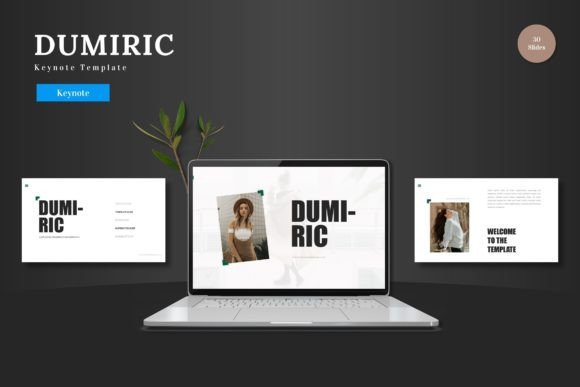
Think of it as a pre-built, fully furnished house for your ideas. Instead of constructing every wall and choosing every fixture, you walk in, move your furniture into the placeholder spaces, and adjust the lighting to suit your style. With 150 total slides organized across five distinct color schemes, Dumiric provides the structure. You provide the content. The outcome is a polished, coherent presentation that looks intentional, not rushed.
Where Dumiric Fits Into Your Workflow
For the entrepreneur racing from investor meeting to client demo, consistency is key. Using Dumiric’s 30 slides per color theme, you can maintain a unified visual language across different pitches. The animated slides add a dynamic touch for key moments, like revealing a new product feature or a milestone achievement, without requiring you to build complex animations from scratch. Because all graphics are resizable and editable directly in Keynote, you can adapt an infographic on-the-fly to include last-minute data, ensuring your presentation feels current and responsive.
Educators and trainers face a different challenge: making complex information accessible. The handcrafted infographics and master slide foundation in Dumiric offer a starting point for breaking down processes, hierarchies, or data trends. The gallery and portfolio slide formats are perfect for showcasing case studies, student work, or a sequence of learning modules. You’re not just making slides; you’re building a visual learning experience where the design supports comprehension.
Freelancers and small business owners often wear every hat, including the designer’s. When promoting a service or a new product line, the drag-and-drop picture placeholder system means you can assemble a professional-looking portfolio or service catalog in minutes. Simply replace the placeholder images with your own screenshots, logos, or product photos. Choosing from the five premade color variations allows you to match the presentation to your brand’s mood—a bold and vibrant scheme for a launch, a calm and professional one for a client report.
The Practical Benefit of Staying Inside Keynote
A core feature of Dumiric Keynote Template is its commitment to a single software environment: Keynote itself. This has a direct impact on your process. There’s no exporting to another app to tweak a shape, no compatibility confusion, and no extra cost for additional graphic software. When you need to change a color, you use Keynote’s native color picker on the slide. When you need to input your content, you type directly into the text boxes provided. This streamlined approach reduces friction and decision fatigue, keeping your energy focused on refining your narrative rather than battling software.
Consider the scenario of last-minute changes. A team member sends updated figures right before a big meeting. Because all elements are editable within the slide you’re already working on, you can integrate those updates immediately. The pixel-perfect illustrations maintain their quality as you resize them to fit new layouts. This flexibility turns a potential crisis into a simple, quick adjustment, preserving the professional quality of your presentation.
Considering Your Needs Before You Download
While Dumiric is built for versatility, a moment of reflection ensures it serves your specific goals. First, consider your primary use case. Is it for high-stakes, external presentations like investor pitches or client wins? The widescreen format and animated slides are significant assets here. Is it for internal, repetitive use, like weekly team updates or training materials? The master slide-based templates and vast selection of slides mean you can create a standard template library for your organization, saving time week after week.
Second, assess your own comfort with Keynote. Dumiric leverages Keynote’s built-in tools, so if you’re already familiar with basics like editing text and replacing images, you’ll be effective immediately. If you’re new to Keynote, the template’s clear structure and provided README file guide you through the process. The learning curve is about applying your content, not learning a new design tool.
Finally, think about longevity. A template is an investment in your future communications. Dumiric’s multipurpose nature—suitable for business, e-commerce, product promotion, and more—means it can scale with your projects. The clean and scalable design won’t look dated, allowing you to reuse and repurpose slides across different initiatives, maintaining a consistent and professional brand image over time.
From Template Slides to Real-World Outcomes
The features listed on a sales page translate to real outcomes in your hands. The 150 total slides aren’t just a number; they’re the assurance that you won’t run out of layout options halfway through building a complex presentation. The 5 color variations are a tool for emotional and brand alignment, letting you choose a palette that subtly influences how your audience feels. The handcrafted infographics become the visual anchors that make your data memorable.
Imagine you’re launching a new app. You use Dumiric’s vibrant color scheme. You populate the portfolio slides with screenshots using the drag-drop placeholder. You use an animated slide to reveal the core unique feature. The infographics explain your user growth projections. The entire presentation tells a cohesive story, and you built it by focusing solely on that story, not on the mechanics of slide design. The template handled the mechanics for you.
For the blogger or creator presenting a webinar, the scenario shifts. Here, clarity and engagement are paramount. The clean layout of Dumiric slides keeps the audience focused on your content. The resizable graphics allow you to create custom diagrams that explain your unique process. You’re presenting your ideas to the world with a visual polish that reinforces your authority and care for your audience’s experience.
Cheers to Presenting Your Ideas with Confidence
Ultimately, Dumiric Keynote Template serves one overarching purpose: to remove the design barrier between your ideas and your audience. It acknowledges that your expertise lies in your content—your business strategy, your product knowledge, your educational material, your creative vision. By providing a robust, editable, and versatile framework within the software you likely already use, it empowers you to package that expertise in a format that commands attention and respect.
Whether your next presentation is a personal project review, a crucial sales deck, or a community workshop, having a tool that adapts to your need without demanding extra time or resources changes the equation. You can move from the anxiety of a blank slide to the confidence of a completed presentation, ready to share. That’s the practical, real-world value of a template like Dumiric—it’s not just about the slides; it’s about getting your message into the world, effectively and without unnecessary hassle.