Elevate Your Presentations with Coreta
Your next presentation shouldn't just convey information—it should captivate your audience and elevate your brand from the very first slide.
In today's visual landscape, where first impressions are critical, the quality of your presentation design directly impacts your message's credibility and memorability. That's where a professional Keynote template like Coreta becomes invaluable. It’s a clean, scalable, and multipurpose solution designed to meet the demanding needs of modern business communication, saving you time while ensuring a polished visual result.
Whether you're pitching to investors, presenting quarterly results, or launching a new product, your slides are a central piece of your visual identity.
A Design Foundation for Any Business Story
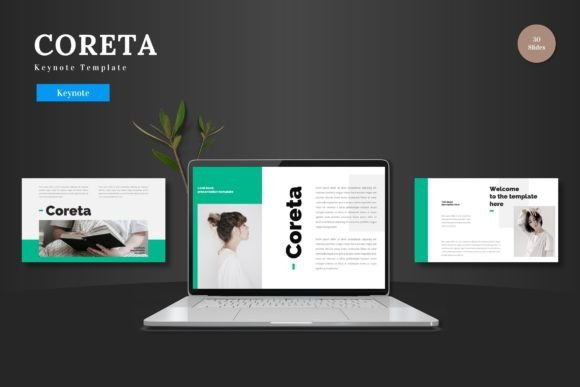
Coreta provides a robust starting point, suitable for business decks, pitch presentations, e-commerce showcases, or product promotions. Its strength lies in offering a complete, editable system. You have 150 total slides across five premade color variations, meaning you get 30 slides for each distinct theme. This built-in variety allows you to adapt the visual tone to different contexts—a formal annual report versus a dynamic product launch—without starting from scratch each time.
Everything, from the handcrafted infographics to the pixel-perfect illustrations, is based on master slides and is fully resizable and editable directly within Keynote. This commitment to an integrated workflow means you can input your content, replace images in the picture placeholder through simple drag-and-drop, and change colors without ever needing another software application. This seamless process respects your time and empowers you to focus on your narrative.
Key Features That Enhance Your Visual Design
Beyond the sheer volume of slides, Coreta includes thoughtful design elements that elevate the final presentation.
- Animated Slides: Strategic motion can guide attention and emphasize key points, making complex information more digestible.
- Gallery and Portfolio Slides: Perfect for showcasing products, team members, or case studies in a visually engaging layout.
- A Structured File System: The package includes the main keynote files, five distinct color schemes, and essential documentation like font and photo information, ensuring you have all resources at hand.
These features are not just decorative; they are tools for building a strong visual hierarchy, ensuring your content is not only beautiful but also communicates with clarity and impact.
Applying Coreta Across Creative Projects
The versatility of a well-designed template extends far beyond traditional presentations. The visual assets within Coreta can inspire and serve other aspects of your creative workflow.
The consistent color palettes and scalable graphics can be a springboard for cohesive marketing materials. The iconography and layout principles can inform social media graphics or website UI elements, ensuring brand consistency across digital touchpoints. For designers, the template’s structure offers a lesson in clean composition and modern aesthetics that can be applied to editorial design or packaging concepts.
Using a template like this encourages a disciplined approach to brand identity. It provides a visual framework, helping you maintain a professional standard across all communications, which is essential for building trust and recognition with your audience.
Ultimately, the choice of your presentation template is a strategic design decision. It’s about selecting a tool that balances flexibility with quality, allowing you to produce work that stands out through its professionalism and visual polish. By starting with a robust foundation like Coreta, you free yourself to concentrate on what matters most: crafting a compelling story and presenting it to the world with confidence. Cheers to more effective and beautiful communication.