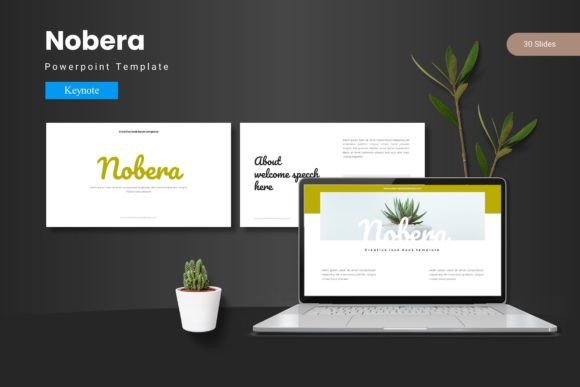
Nobera: Your Key to Professional Keynote Presentations
In today’s world, a presentation is more than just sharing information; it’s an experience. Whether you’re pitching to investors, educating a class, or launching a product, your slides are the visual backbone of your story. The Nobera - Keynote Template is designed to be that reliable, adaptable backbone—a comprehensive toolkit that transforms the often tedious process of slide design into a streamlined, creative endeavor.
What makes the Nobera template interesting isn't just its aesthetic, which is clean and contemporary, but its thoughtful structure. It provides a foundation built for cohesion and engagement, allowing you to focus on your message rather than wrestling with alignment and style consistency. With 150 total slides spread across 5 premade color schemes, it offers breadth without overwhelming you. Each color variation comes with 30 dedicated slides, ensuring that if you choose a specific palette, you have a complete presentation ready to be tailored.
Unlocking Creative Possibilities Within a Framework
The true power of a template like Nobera lies in its balance between structure and freedom. It gives you a starting point that is professional and polished, but every element is a launchpad for your own ideas. The handcrafted infographics, pixel-perfect illustrations, and resizable graphics are not just static decorations; they are modular components. Think of them as building blocks.
For instance, a financial marketer can use the infographic slides to visualize market growth with custom data, while an educator might repurpose the same layouts to explain a scientific process. The included gallery and portfolio slides are perfect for a designer showcasing their work or a small business owner highlighting customer case studies. Because all graphics are editable, you can change colors to match your brand exactly, or even adjust shapes to better represent your unique content. The picture placeholder system, where you can drag and drop your images, removes technical barriers, making the process intuitive and fast.
A Template for Every Voice and Every Audience
The needs of a freelancer presenting to a single client differ from those of an entrepreneur addressing a large conference. The Nobera - Keynote Template accommodates this spectrum through its master slide-based design and section break slides. Master slides ensure that your font choices, logo placement, and color accents remain consistent across every slide you create, which is crucial for maintaining professionalism and credibility—key aspects of Google's E-E-A-T principles.
Let’s explore some practical applications:
- Creators & Bloggers: Use the template to craft visually compelling presentations for online courses or webinar content. The clean layouts ensure screen readability, and the 5 color variations allow you to choose a scheme that fits your channel’s mood—bright and energetic or muted and sophisticated.
- Marketers & Small Business Owners: Develop pitch decks, annual review presentations, or product launch stories. The portfolio slides can be adapted to show product evolution or client testimonials. Consistency here builds brand recognition.
- Educators & Trainers: Structure lesson plans or workshop materials. The section break slides are perfect for dividing topics, and the infographics can simplify complex theories. Keeping information organized and audience-friendly is straightforward.
- Designers & Hobbyists: Even if you’re not a presentation expert, the template allows you to produce work that looks expertly designed. It’s a tool for learning good design principles like hierarchy and spacing through practice.
Moving Beyond Customization: Making it Original
Customizing layouts, fonts, and colors is the first step, but the goal is to make the final presentation feel uniquely yours. This is where practical inspiration becomes key. Start with your core message. What is the one thing your audience should remember? Build your slide sequence around that.
Use the provided illustrations not just as-is, but consider combining them. A resizable icon from one slide might become a repeating visual motif throughout your presentation. The five included color schemes are starting points; you can pull one dominant color and mix it with your own accents to create a hybrid palette that stands out. The key is to use the template's consistency to ensure clarity, while your custom content provides the originality.
For a realistic example, imagine an entrepreneur using the "blue theme" from Nobera for a tech startup pitch. They keep the master slide fonts and layout for a clean, trustworthy feel. They then edit the infographic slides to map out their user growth trajectory, using custom data points. They drag-and-drop high-quality photos of their team into the picture placeholders on the "about us" slide. The result is a presentation that feels cohesive, professional, and specifically tailored to their story—all achieved without starting from a blank canvas.
Recommendations for Effective Adaptation
To get the best results from any template, including the Nobera - Keynote Template, follow a few grounded principles:
- Audience First: Before you even open the template file, consider your audience's expectations. A formal boardroom presentation might use a more subdued color variation and straightforward layouts, while a creative industry talk could leverage the more vibrant schemes and dynamic infographics.
- Content Hierarchy: Use the different slide layouts (title, body, section, gallery) to create a clear flow. Guide your audience through your narrative logically.
- Visual Balance: Don’t overcrowd slides. The template provides ample space and clean design; respect that by keeping text concise and using visuals to support, not distract.
- Brand Alignment: Effortlessly match the template to your needs by importing your brand fonts (if they differ) and logo. The editable nature makes this integration seamless.
Remember, the included Readme file, font information, and photo details are practical resources. They help you implement the template correctly and understand its components, saving you time and preventing technical hiccups that can derail creativity.
The Final Mark: Presentations That Resonate
The ultimate aim of any presentation is to leave a lasting mark—to inform, persuade, or inspire. A tool like the Nobera - Keynote Template removes the friction of design, allowing you to channel your energy into crafting that message. It’s useful because it handles the fundamentals of good visual design, giving you a canvas that already works.
This approach is inherently creative. It’s about applying your ideas within a proven framework. For the freelancer, it’s speed and quality. For the educator, it’s clarity and engagement. For the marketer, it’s impact and brand consistency. By providing 150 slides across 5 colors, handcrafted assets, and full editability, Nobera supports a wide range of presentations styles and professional needs.
In practice, this means your next presentation doesn’t have to begin with a struggle against empty slides. It can begin with a choice: which color story fits my topic today? Which infographic best illustrates my point? How can I arrange these elements to tell my unique story? The template provides the options and the flexibility; you provide the vision and the voice. That combination is where truly effective, audience-friendly presentations are born—clear, organized, and memorable.