Nuroca: The Keynote Template for When You Need to Make an Impression, Not Spend Hours Designing
Imagine you have a crucial investor pitch in 48 hours. Or a major product launch presentation next week. Your content is solid, your data is compelling, but the slides look… well, a bit cobbled together from different templates. The colors clash, the graphs are basic, and the overall feel lacks that professional polish that commands attention and builds trust. This is the exact real-world scenario where the Nuroca - Keynote Template steps in as a practical solution.
More Than Just Slides: A Design Foundation for Your Story
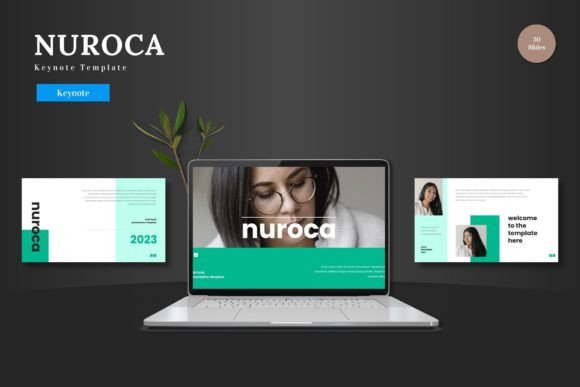
The Nuroca - Keynote Template isn't merely a collection of background images. It's a complete, editable framework built directly within Apple Keynote. Think of it as a professionally designed architectural blueprint for your presentation. You bring your own content—the text, the data, the photos—and the template provides the clean, scalable, and colorful structure to house it elegantly. The core value is in its multipurpose nature. Whether you're in business development, e-commerce, or creative services, the foundational design is already handled, freeing you to focus purely on your message.
Real-World Applications: Who Actually Uses This?
Let's move past the generic "business" label and look at specific situations. A startup founder uses Nuroca to create a consistent pitch deck for meetings with different venture capitalists, ensuring branding remains cohesive and professional across all communications. A marketing manager leverages its portfolio slides to present a new campaign rollout to the executive team, using the animated slides to reveal key metrics with impact. A freelance consultant employs the template to deliver a sleek, client-specific proposal, replacing the placeholder images with snapshots of the client's own products to create an immediate sense of personalization.
The beauty lies in its adaptability to different audiences. Presenting to tech-savvy investors? The clean, infographic-driven slides convey data clarity and innovation. Speaking to creative clients? The colorful variations and picture placeholder galleries highlight visual thinking. It serves both the person who needs to look established and the individual who wants to present a personal project with professional flair.
Considering Your Workflow: The Keynote-Centric Advantage
A common consideration before choosing any template is software dependency. Many premium templates require you to jump between PowerPoint, Illustrator, or other tools to edit elements. Nuroca operates entirely within Keynote. This is a significant strength for Mac users who prefer Keynote's interface and rendering. Every shape, infographic, and illustration is editable directly on the Keynote slides. You change colors, input content, and replace images without ever needing another application. This streamlined workflow reduces friction, especially under time pressure.
However, this is also a potential limitation to consider. If your team or organization is standardized on PowerPoint or Google Slides, a Keynote-native template like Nuroca may not integrate into your shared ecosystem. It's perfect for individual creators or Mac-based teams, but cross-platform compatibility is not its function. The practical observation here is to match the tool to your primary presentation software.
The Strength of Ready-Made Structure
With 150 total slides spread across 5 premade color variations, Nuroca offers volume and choice. The 30 slides per color scheme provide a deep reservoir of layout options—title slides, section breaks, comparison charts, quote pages, team profiles, and data visualizations. This means you aren't forced to use the same three slide layouts throughout a 20-minute presentation, which helps maintain audience engagement. The handcrafted infographics and pixel-perfect illustrations are not just decorative; they are functional communication tools. A well-designed roadmap or process chart can explain a complex system faster than paragraphs of text.
The "drag and drop" picture placeholder feature is a notably practical touch. It acknowledges the reality that most users aren't graphic designers. You simply drag your own photo onto the placeholder, and it fits into the designed frame, automatically cropping and sizing appropriately. This alone can save countless minutes of manual image adjustment.
From Personal Branding to Product Launches: Scenario Exploration
Beyond corporate settings, consider a creative professional—an artist, photographer, or designer—using Nuroca to present their portfolio. The gallery slides offer a structured yet beautiful way to showcase work to potential clients or galleries. The color variations can be matched to the mood of the portfolio: bright and vibrant for a children's book illustrator, or muted and professional for an architectural photographer.
In an e-commerce context, an in-house team might use the template to present a new website UX flow to stakeholders, or to analyze quarterly sales performance using the editable chart graphics. The multipurpose claim holds because the design is modern and content-agnostic; it frames information without imposing a specific industry aesthetic.
For educational or workshop purposes, a trainer could utilize the section break slides and clear hierarchies to segment a day-long seminar into digestible parts, maintaining visual consistency that aids learning. The template supports the narrative arc of any presentation, from problem statement through solution to final call to action.
Making the Decision: Is This Template Right for Your Needs?
Before applying Nuroca or any similar template, ask a few practical questions. Do you primarily use and prefer Apple Keynote? Is your need for a complete, from-start-to-finish slide foundation, rather than just a few inspiration slides? Are you looking for a design that balances clean modernity with enough color personality to avoid being sterile? Do you value having resizable and editable graphics so you can tweak an infographic to match your exact data point?
If your answers lean yes, then Nuroca - Keynote Template aligns well. Its strength is offering a large, coherent, and immediately usable system. The included animated slides provide a tool for adding measured dynamism without requiring you to build complex animations from scratch. The main file includes the five key files for the widescreen color schemes, along with clear guidance on fonts and photo information, which helps maintain quality and avoid font substitution issues that can break a design's cohesion.
Ultimately, tools like Nuroca solve a very human problem: the scarcity of time and specialized design skill. They allow a subject-matter expert to present as a confident, polished communicator. By handling the design fundamentals, it lets you focus on what you're actually presenting to the world—your ideas, your products, your business, or your creative work. And when the presentation ends, the impression left is about your content, delivered through a vessel that looks intentionally and professionally crafted.