Evaluating Suleva: A Comprehensive Look at the Keynote Template
When preparing a presentation, the choice of template is a foundational decision. It sets the tone for your content, influences audience perception, and can significantly impact the efficiency of your workflow. The Suleva - Keynote Template is one option among many in this space, designed to offer a clean, scalable, and multipurpose foundation for presentations. Understanding what it provides, its distinct approach, and where it fits best can help you determine if it aligns with your specific needs.
What Is the Suleva - Keynote Template?
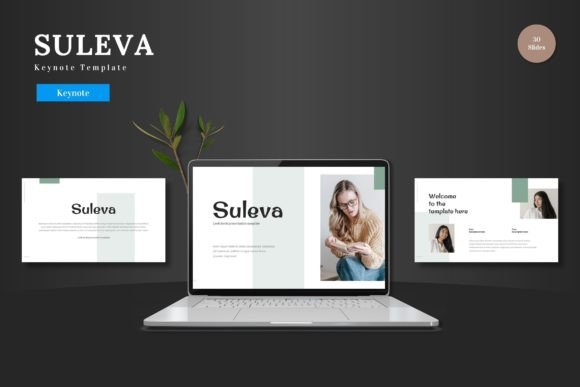
The Suleva - Keynote Template is a pre-designed set of slides specifically for Apple’s Keynote application. Its core proposition is to deliver a ready-to-use framework that is both visually polished and functionally adaptable. The description highlights its clean design, scalability, and colorful nature, positioning it as suitable for a variety of purposes, from business pitch decks and e-commerce promotions to general product showcases. A key feature emphasized is its self-contained editability: all elements are designed to be modified directly within Keynote, from shapes to colors and image placeholders, without requiring auxiliary software. This includes the creation of animated slides, aiming to provide a complete toolkit for building and presenting.
Distinctive Characteristics and Core Features
Several aspects define the Suleva template and differentiate it from a generic blank slide deck or other templated approaches.
A Focus on In-App Editing
Many premium templates require users to toggle between different programs—for instance, using a separate graphic editor to customize illustrations before importing them. The Suleva - Keynote Template explicitly addresses this by structuring all elements to be editable within Keynote itself. This means shapes, infographics, and illustrations are built using Keynote’s native tools. For users who prefer to work entirely within one application and are proficient with Keynote’s editing functions, this can streamline the process considerably, reducing technical friction and potential formatting issues.
Structure and Volume
The template offers 150 total slides distributed across five premade color variations, meaning 30 slides are available per color theme. This volume provides a substantial library of starting points, including section breaks, portfolio slides, and handcrafted infographics. Compared to a minimalist template offering only 10-15 slides, Suleva’s breadth is a notable feature, potentially reducing the need to create slide layouts from scratch for longer or more varied presentations.
Visual Design Philosophy
The descriptors “clean,” “colorful,” and “pixel-perfect” point to a specific visual style. Clean design typically favors ample white space, clear typography, and uncluttered layouts, which aids readability. The inclusion of multiple color schemes suggests an awareness of brand customization, allowing the same structural template to adapt to different corporate palettes or thematic moods. This combination aims to balance professional polish with visual energy, which may be particularly relevant for audiences in competitive fields like startups or product marketing.
Considering Alternatives and Tradeoffs
No template is universally perfect. The suitability of Suleva - Keynote Template depends on weighing its offerings against other available paths and your own requirements.
Comparison with Building from Scratch
The most fundamental alternative is creating a presentation entirely from blank slides. This offers maximum creative freedom and ensures every element is tailored exactly to your vision. However, it demands significant time, design skill, and attention to consistent formatting. The Suleva - Keynote Template trades some of that absolute freedom for efficiency and a guaranteed baseline of visual coherence. For individuals or teams under time constraints, or those lacking dedicated design resources, this tradeoff often leans toward using a robust template.
Comparison with Other Templated Solutions
The presentation template market is vast, ranging from free, basic options to highly specialized, industry-specific kits. When evaluating Suleva against this landscape, consider its stated multipurpose nature. While suitable for business, pitch decks, and e-commerce, it may not contain niche slides for, say, academic research data or intricate financial forecasts that a more specialized template would. Its strength lies in versatility for general commercial and promotional communication. Furthermore, its deep integration with Keynote’s native editing tools is a specific advantage for Keynote users but would be irrelevant for those committed to PowerPoint or Google Slides.
The Tradeoff of Structure vs. Uniqueness
Using a comprehensive template like Suleva provides a strong, pre-defined structure. This can be immensely helpful, ensuring a logical flow and professional layout. However, a potential limitation is that your presentation may bear visual similarities to others using the same template framework, especially if customizations are minimal. The template encourages uniqueness through editable colors, image replacement, and content input, but the underlying layout patterns will remain. If brand differentiation through utterly unique slide design is a top priority, a more customized approach, perhaps using Suleva as a starting point for heavy modification, might be necessary.
Best-Fit Scenarios and Decision Factors
Determining when the Suleva - Keynote Template is the right choice involves assessing your specific context.
When Suleva May Be an Excellent Fit
- Keynote-Loyal Users: If your workflow is firmly within Apple’s Keynote ecosystem, a template designed for deep in-app editing avoids compatibility headaches.
- Need for Speed and Scale: When facing a tight deadline or needing to produce a lengthy presentation (like a multi-chapter product launch deck), the 150-slide library can accelerate development.
- Versatile Commercial Needs: For businesses that require presentations for various purposes—investor pitches, internal updates, product galleries—the multipurpose claim aligns well.
- Moderate Customization Required: If you need to adapt colors and imagery to match your brand but are comfortable with the provided layout logic, Suleva facilitates that.
When Another Option Might Be Needed
- Platform Agnosticism or PowerPoint Use: If your team uses multiple presentation software or relies on PowerPoint, a template native to Keynote loses its core convenience advantage.
- Highly Specialized Content: For presentations demanding very specific slide types (complex scientific diagrams, detailed architectural plans), a general multipurpose template may lack the necessary frameworks.
- Maximum Design Originality: If the visual design itself is a primary competitive differentiator, starting from a more blank canvas or a less structured template might offer greater freedom.
- Minimalist Needs: For a short, simple presentation, the extensive slide count of Suleva might be overkill, and a simpler, cheaper template could suffice.
Practical Application and Realistic Examples
Consider a mid-sized tech startup preparing for a series of presentations: a funding pitch to venture capitalists, a launch webinar for a new app, and internal strategy reviews. Using the Suleva - Keynote Template, the team could employ the same master file. For the pitch deck, they might use the bold color scheme and animated slides to create dynamism. For the internal review, they could switch to a more subdued color variation and leverage the infographic slides for data visualization. The placeholder images allow quick swapping of product screenshots, and the editable shapes let them tweak icons to loosely match their app’s UI. This scenario showcases the template’s multipurpose utility and efficiency gains.
Conversely, a freelance graphic designer presenting their portfolio might prioritize a presentation that is a direct extension of their unique artistic style. While they could use Suleva and heavily modify every slide, they might find the process of deconstructing the pre-set layouts more tedious than building a simpler, custom structure from fewer base slides. Their decision factor leans more toward unique expression than structured efficiency.
Making an Informed Choice
Evaluating the Suleva - Keynote Template, or any similar resource, hinges on a clear assessment of your priorities. Key factors include your primary presentation software, the required presentation length and complexity, the need for design customization versus speed, and the specificity of your content. The template’s emphasis on in-application editing, substantial slide count, and versatile visual style are its defining benefits. By weighing these against the tradeoffs of structure and platform specificity, you can determine if it serves as a helpful foundation for your presentations or if your needs point toward a different solution. Ultimately, the goal is to select a tool that supports your message effectively, without introducing unnecessary obstacles into your creative process.