Evaluating the Eronami Google Slide Template for Professional Presentations
When tasked with creating a professional presentation, the foundation you choose can significantly impact both the process and the final outcome. Pre-designed templates, like the Eronami Google Slide Template, offer a structured starting point. This article provides a balanced evaluation of this specific template suite, examining its features, potential applications, and considerations to help you determine if it aligns with your presentation needs.
What is the Eronami Google Slide Template?
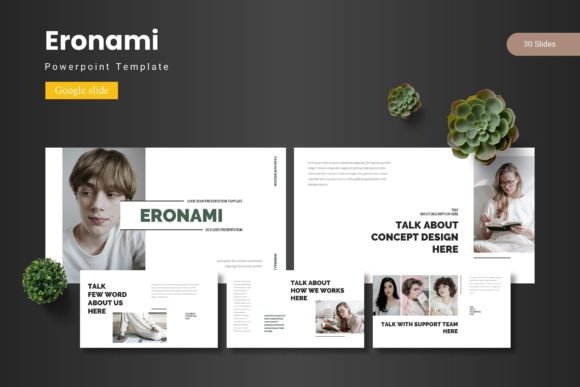
The Eronami Google Slide Template is a comprehensive suite of presentation slides designed for use within Google Slides. It is not a single template but a collection providing multiple options. The core offering includes 150 total slides distributed across five distinct premade color schemes, with 30 slides dedicated to each color variation. The template emphasizes visual design, incorporating handcrafted infographics, pixel-perfect illustrations, and a focus on master slide layouts to ensure consistency. Key advertised features include section break slides, resizable and editable graphics, picture placeholder functionality for drag-and-drop image insertion, and dedicated slides for gallery and portfolio showcases. The main download includes PowerPoint (PPTX) files alongside the Google Slides versions, along with documentation covering fonts and photo information.
Reasons for Considering a Premium Template
Individuals and professionals might explore templates like Eronami for several practical reasons. The primary motivation is often efficiency. Building a visually cohesive presentation from a blank canvas requires considerable time and design skill. A robust template provides a ready-made structure, eliminating the need to create every slide layout, color palette, and graphic element independently. For users who value aesthetics but lack advanced graphic design expertise, such templates offer a path to a polished, professional-looking result. Furthermore, templates can inspire content organization by providing logical slide sequences, such as dedicated sections for agendas, team introductions, data visualization, and case studies, which might be overlooked when starting from scratch.
Potential Benefits and Advantages
Utilizing the Eronami Google Slide Template presents several potential benefits. The volume of slides (150 across five colors) offers extensive variety within a consistent design language, allowing for a tailored presentation without visual fragmentation. The inclusion of master slides and editable infographics is a significant advantage for customization; users can adjust charts, icons, and layouts to better fit their specific data and message without breaking the overall design. The multiple color schemes enable quick thematic changes, useful for adapting a presentation for different brands, departments, or occasions. The drag-and-drop picture placeholder feature simplifies the process of inserting images, a common pain point in presentation design. Finally, having both PPTX and Google Slides files increases flexibility, accommodating environments that use either platform.
Tradeoffs and Important Considerations
While benefits are clear, there are inherent tradeoffs when using any pre-built template. The most significant is the potential for a generic feel. Even with customization, presentations built on widely available templates can sometimes lack a unique brand identity. Heavy reliance on the template’s default structure might also inadvertently constrain content flow, forcing information into predefined boxes that aren't optimal. Another consideration is learning curve. Effectively leveraging all features, especially editing master slides and complex infographics, requires a basic understanding of Google Slides' deeper functionality, which may be a hurdle for absolute beginners. Users must also verify that the provided fonts are available and compliant with their organization's policies, as font changes can alter the intended design. The template's contemporary aesthetic, while professional, may not suit every industry or formal context.
Situations Where Eronami May Be a Strong Fit
The Eronami Google Slide Template could be an excellent solution in specific scenarios. It is well-suited for professionals in marketing, consulting, entrepreneurship, and education who need to produce frequent, high-quality presentations under time constraints. Its design appears geared towards modern business pitches, product showcases, portfolio reviews, and corporate reports. Teams within an organization that lack a dedicated design department but require cohesive visual materials for client meetings or internal strategy sessions would find value in its structured approach. Individuals preparing for important events like conferences, investor meetings, or academic defenses, where visual polish impacts credibility, can benefit from the comprehensive slide library. The five color variations also make it practical for companies or individuals who present under different sub-branding or project themes.
When Alternatives Might Be Worth Considering
Despite its features, alternatives should be explored in certain situations. If your presentations require stringent adherence to a company's exact brand guidelines—using specific logos, color hex codes, and typography—a custom template built from those guidelines is often preferable. For highly technical or scientific presentations where data clarity is paramount over visual flourish, simpler, more minimalistic templates or even self-built layouts might communicate more effectively. Users with very basic presentation needs, such as creating simple internal updates or training documents, might find the extensive features of Eronami overkill and could opt for free, basic templates within Google Slides or PowerPoint. Furthermore, if budget is a primary constraint, the many free template resources available online could serve adequately, though they typically offer less depth and cohesion than a premium suite.
Practical Decision-Making Insights
To decide if the Eronami Google Slide Template is right for you, conduct a practical self-assessment. First, evaluate your typical presentation workload. Do you create decks regularly, or is this for a one-off project? Regular users will derive more value from a comprehensive investment. Next, honestly appraise your own design skill and time availability. If you struggle with layout and spend hours on formatting, a template saves time and improves quality. However, if you are proficient in design tools, you might only need specific graphic assets rather than a full template. Review the template's sample slides or demo carefully; ensure its visual tone matches the expectations of your audience and industry. Finally, consider compatibility: confirm that working primarily in Google Slides is viable for your workflow and that any required transitions to PowerPoint (using the included PPTX files) are seamless for your context.
Aligning the Template with Your Goals and Needs
Ultimately, the value of the Eronami Google Slide Template hinges on alignment with your specific goals. If your primary need is to accelerate the creation of visually consistent, professional presentations without deep design work, this template suite addresses that need directly. Its strength lies in offering a substantial, editable framework. However, if your goal is to establish a highly unique, bespoke brand identity in every communication, or if your content demands extremely specialized slide layouts, a custom design solution remains the superior path. By weighing the benefits of efficiency and polish against the considerations of generic potential and required adaptation, you can make an informed decision. A premium template like Eronami is a tool—its effectiveness depends on how well it fits the task at hand and the skill of the user wielding it.