Evaluating the Manius PowerPoint Template for Professional Presentations
In the landscape of professional communication, a PowerPoint presentation often serves as the cornerstone for sharing ideas, data, and strategies. The choice of template can significantly influence the clarity, impact, and reception of this content. Among the options available, the Manius PowerPoint template is designed as a comprehensive tool aimed at users seeking a structured, visually-oriented foundation for their slide decks. This article provides an objective evaluation of the Manius template, exploring its features, potential fit for different scenarios, and key considerations for potential users.
What is the Manius PowerPoint Template?
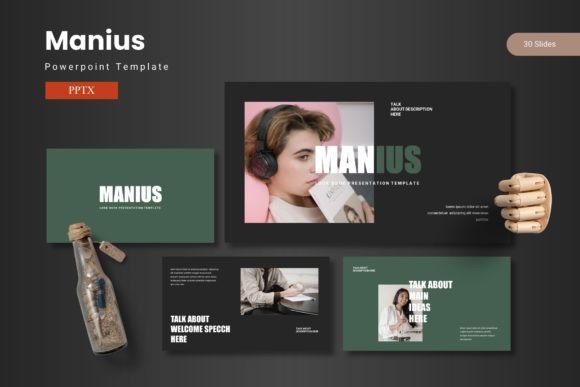
The Manius PowerPoint template is a pre-designed set of slides for Microsoft PowerPoint. It is packaged as a digital product containing the main file formats and resources needed to build a presentation. Its core offering is a collection of 150 total slides, organized into 5 distinct premade color schemes, with 30 slides allocated to each color variant. The template emphasizes visual design, featuring handcrafted infographics, pixel-perfect illustrations, and a variety of layout slides such as section breaks, galleries, and portfolios. All graphical elements are resizable and editable, and the template utilizes master slides to ensure consistency. The package includes the primary PPTX files, a readme guide, and information on fonts and recommended photography.
Potential Reasons for Interest
Individuals or teams might consider the Manius PowerPoint template for several practical reasons. A primary driver is often time efficiency. Creating a visually cohesive presentation from a blank slate requires significant effort in design, layout, and asset creation. A template like Manius provides a ready-made starting point, potentially reducing production time. Another reason is a desire for a polished, professional aesthetic without requiring advanced graphic design skills. The inclusion of handcrafted infographics and illustrations aims to offer a level of visual sophistication that might be difficult to achieve independently. Furthermore, users dealing with complex data or multiple content types (like portfolios or image galleries) may value the specialized slide layouts designed for these purposes.
Key Features and Stated Benefits
The feature set of the Manius template is centered on versatility and control. The 5 color variations provide immediate thematic options, which can be useful for aligning with brand colors or presentation tone. The master slide foundation is a standard PowerPoint feature that allows global changes to fonts, colors, and backgrounds, promoting consistency across a lengthy deck. The editable and resizable graphics offer flexibility, allowing users to adapt icons and illustrations to their specific content. Practical elements like picture placeholders with drag-and-drop functionality and dedicated gallery slides aim to streamline the process of incorporating visual media.
A stated benefit is the ability to share ideas with confidence using a visually structured framework. The template attempts to combine data representation, graphics, and impactful content layouts. For a user with a clear message but uncertain visual execution, such a template could serve as a helpful guide. The large number of slides (150) also suggests a wide variety of layout choices, potentially covering many common presentation scenarios from title slides to detailed data breakdowns.
Tradeoffs and Important Considerations
While templates offer advantages, it is crucial to evaluate potential tradeoffs. First, the sheer volume of 150 slides across 5 colors means the user must navigate a substantial library of layouts. This can be overwhelming and may still require careful curation to avoid a cluttered or disjointed final presentation. The quality and relevance of the handcrafted infographics are subjective; they must align with the user's specific data types and industry conventions to be effective.
A significant consideration is customization depth. Although graphics are editable, the extent of this editability depends on the user's proficiency with PowerPoint's graphic tools. True customization beyond color changes or simple resizing might require intermediate skills. Furthermore, reliance on a template can sometimes constrain creative expression or lead to presentations that feel generic if not sufficiently personalized. The user must invest time in adapting the template to their unique voice and content.
Expectations should also be managed regarding the "effortless" creation claim. While a template reduces initial design work, crafting a resonant presentation still demands thoughtful content organization, narrative flow, and effective delivery practice. The template is a tool, not a substitute for these core skills.
Situations Where Manius May Be a Strong Fit
The Manius PowerPoint template could be a suitable choice in specific practical scenarios. It may align well with corporate or business environments where presentations need to be data-driven, visually professional, and produced under time constraints. Teams with standard brand guidelines could utilize the color variations to quickly match corporate palettes. Individuals such as consultants, educators, or marketing professionals who regularly present complex information with supporting visuals might find the infographic and data slide layouts particularly useful.
It is also a potential fit for users who possess moderate PowerPoint competency but lack dedicated design support. The template provides a structured design framework that can elevate visual output beyond basic PowerPoint defaults. Projects requiring a multi-section presentation, such as a business plan, annual report, or product portfolio, could benefit from the included section break and gallery slides.
When Alternatives Might Be Worth Considering
Despite its features, alternatives to the Manius template should be explored in certain situations. Users requiring extreme customization or a highly unique, avant-garde aesthetic might find pre-designed templates limiting. In such cases, starting from a blank presentation or commissioning a custom design could be more appropriate.
For presentations that are exceedingly simple, narrative-driven, or require minimal visual embellishment, a complex template like Manius might introduce unnecessary overhead. The basic built-in templates in PowerPoint or simpler, minimalistic third-party templates could be more efficient. Additionally, users who primarily use other presentation software (like Google Slides, Keynote, or Canva) would obviously need a template native to their chosen platform.
Budget is another consideration. While template costs vary, the investment in a premium template like Manius should be weighed against the frequency of use and the critical importance of presentation quality for the user's goals. For occasional presenters, free or lower-cost resources might suffice.
Practical Decision-Making Insights
To determine if the Manius PowerPoint template aligns with your needs, conduct a practical self-assessment. First, review your typical presentation content: Is it heavily reliant on data charts, process flows, and image displays? If yes, the infographics and specialized slides may be valuable. Second, evaluate your design skill and time resources: Does using a structured template realistically save you time and improve your output? Third, consider your presentation's audience: Does a polished, graphic-heavy style resonate with them, or would a simpler approach be more effective?
It is advisable to scrutinize the actual template files if a demo is available. Examine if the illustration style matches your tone, if the data graphics are adaptable to your metrics, and if the overall layout variety seems useful rather than excessive. Finally, think about long-term use: Will you use this template for multiple presentations, making the investment worthwhile? A template like Manius is most justifiable when it becomes a reusable asset that consistently enhances your communication workflow.
In conclusion, the Manius PowerPoint template is a feature-rich design resource aimed at users seeking a visual foundation for their presentations. Its value hinges on the alignment between its structured, graphic-oriented approach and the specific content, skills, and objectives of the user. By carefully weighing its comprehensive features against the need for personalization and the realities of your presentation demands, you can make an informed decision on whether it serves as a helpful tool in achieving your communication goals.