Evaluating Alosa: A Multipurpose PowerPoint Template for Professional Use
In the realm of professional communication, the presentation deck remains a fundamental tool. Its effectiveness hinges not just on content, but on clear, visually coherent design that supports the narrative without distracting from it. For individuals and teams lacking dedicated design resources, finding a template that balances aesthetic appeal with practical utility is a common challenge. The Alosa - PowerPoint Template presents itself as a potential solution, offering a structured, editable framework designed for a variety of presentation needs.
A Template Built for Versatility and Direct Editing
The core proposition of the Alosa template is its multipurpose design and inherent editability. It is described as suitable for business, pitch decks, e-commerce, and product promotion, indicating a focus on commercial and professional contexts. More significantly, its design philosophy emphasizes direct manipulation within the PowerPoint application itself. All elements, from shapes to infographics, are built using native PowerPoint features. This means users can adjust colors, resize graphics, and input content without requiring auxiliary software like Adobe Illustrator or Photoshop. This approach lowers the technical barrier for customization, making it accessible to users proficient in PowerPoint but not in specialized graphic design tools.
The practical value here is time and resource efficiency. When a placeholder image can be replaced by a simple drag-and-drop, or a color scheme altered through the built-in theme colors, the workflow remains within a single, familiar environment. This is a notable strength for professionals who need to iterate quickly on presentation content, perhaps adapting the same base deck for different clients or internal stakeholders. The inclusion of animated slides also acknowledges the modern expectation for dynamic, albeit not overly complex, visual transitions during a presentation.
Structural Composition and Key Features
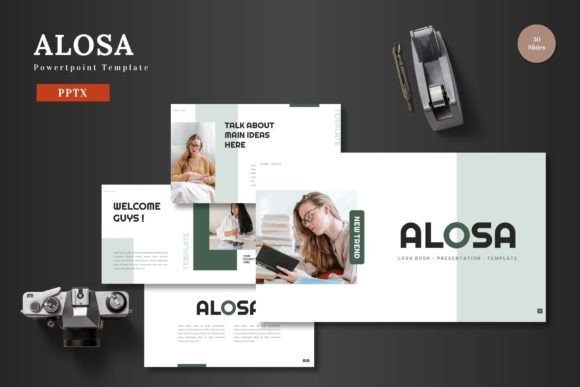
The template provides a substantial volume of slides, organized across five distinct color variations. With 150 total slides—30 for each color scheme—it offers a broad library of starting points. This structure likely includes standard title, agenda, and content slides, but also more specialized layouts like galleries, portfolios, and section breaks. The mention of handcrafted infographics based on master slides suggests a commitment to visual consistency. When infographics are derived from master layouts, they maintain a uniform style across the entire deck, which is crucial for professional credibility.
Features like pixel-perfect illustrations and resizable, editable graphics address common quality concerns. Pixel-perfection implies attention to detail in the original design files, reducing visual artifacts when slides are displayed on high-resolution screens. The resizable nature of all graphics, without loss of quality, is a practical necessity, as content needs often require adjusting the size of charts, icons, or diagrams to fit varying amounts of textual information. Picture placeholder functionality streamlines the often tedious process of image insertion and cropping, directly impacting usability.
Analyzing Real-World Application and Performance
In a real-world scenario, the utility of a template like Alosa depends heavily on its foundational design quality and adaptability. A template with 150 slides across five colors provides options, but the true test is how well the individual slide layouts serve actual content. For a pitch deck, slides must facilitate a clear storytelling arc: problem statement, solution, market opportunity, business model, and team. For e-commerce, the focus shifts to product showcases, feature breakdowns, and perhaps data-driven results. The template's multipurpose claim must be validated by having layouts that are genuinely conducive to these different narrative structures.
Usability extends beyond initial setup. During a presentation's lifecycle, slides often undergo revisions. The all-in-Powerpoint editing promise means these revisions should be straightforward. However, a possible limitation to consider is template bloat. With such a large number of slides and variations, users might spend time navigating the file to find the most suitable layout, or might feel compelled to use overly complex designs simply because they are available. Effective use requires a disciplined approach: selecting a coherent color scheme and a subset of slide layouts that best match the presentation's tone and content density.
Audience Fit: Who Benefits Most from Alosa?
This template appears tailored for a specific user profile: the professional who values design consistency but operates without a dedicated design team. Entrepreneurs crafting investor pitches, marketers presenting campaign results or new product launches, freelancers showcasing their portfolio, and small business owners reporting to partners or banks would find immediate application. Educators or trainers delivering professional development material could also leverage its structured layouts. Its value is pronounced in situations where presentation quality directly influences outcomes—such as securing funding, winning a client, or internal project approval.
For bloggers or publishers creating supplementary visual content for webinars or conferences, the template offers a ready-made visual identity. However, serious hobbyists might find the extensive business-oriented layouts less relevant unless their projects have a commercial or formal presentation aspect. The key is the need for a polished, scalable visual framework that can be controlled entirely by the content creator.
Long-Term Value and Considerations
The long-term value of a PowerPoint template like Alosa hinges on its reliability and the consistency it provides to an individual or organization. If a company adopts one of its color schemes and set of master slides for all internal and external presentations, it builds a recognizable visual brand. The editable nature ensures it can evolve with the company's branding over time. The provided files—five separate PPTX files for each color scheme in widescreen format—offer a clean starting point without the clutter of all variations in one file, which is a thoughtful delivery method.
A practical recommendation for potential users is to critically assess the template's "default" aesthetic against their own brand identity or personal style. While color variations offer choice, the underlying illustration style and layout philosophy are fixed. It is wise to review the provided demo or sample slides to ensure the visual tone aligns with your intended message—whether it needs to be bold and colorful or more subdued and analytical. Furthermore, while animated slides are included, their use should always be purposeful and not detract from the core content.
Ultimately, the Alosa - PowerPoint Template represents a significant toolkit for presentation creation. Its strengths lie in its comprehensive slide library, dedicated in-app editing capabilities, and design geared for professional contexts. Its effectiveness is not automatic; it requires the user to selectively employ its resources to build a clear, focused narrative. For the target audience of professionals and creators who regularly communicate through slides and seek a balance between design quality and hands-on control, it offers a viable, practical foundation worth considering.