The Polipac Powerpoint Template: A Multipurpose Toolkit for Streamlined Presentation Creation
In the world of professional and personal communication, the presentation stands as a universal tool. It's the vessel for pitching an idea, explaining a complex process, showcasing a portfolio, or teaching a concept. Yet, the very act of building that vessel—designing slides, aligning graphics, ensuring visual consistency—often consumes more time and creative energy than the content itself. This is where purpose-built templates like the Polipac Powerpoint Template shift the workflow from laborious construction to efficient, focused assembly.
Where Polipac Fits Into Your Content Creation Process
A PowerPoint template is not merely a background image or a set of fonts; it is a foundational framework. The Polipac Powerpoint Template enters your workflow at the critical juncture between planning and execution. Once you have outlined your message, gathered your data, and defined your narrative, the next practical step is structuring that raw material into a visual format. Polipac provides that structure, allowing you to immediately channel your effort into content input rather than graphic design.
Consider a common project arc: research, content development, design, rehearsal, and delivery. Traditionally, the "design" phase is a bottleneck, demanding skills that may lie outside the core competencies of a business owner, educator, or marketer. By integrating the Polipac template at the start of the design phase, you effectively bypass the most time-intensive part of slide creation. The clean, scalable, and colorful layouts are already established, so your process transitions directly to populating those proven layouts with your specific information. This reallocates time back to refining your message and rehearsing your delivery, which are far more impactful on the final outcome.
A Practical Anatomy of the Polipac Template
Understanding the components of the Polipac Powerpoint Template is key to leveraging it effectively. Its design philosophy centers on completeness and internal consistency.
The Core Structure: Master Slides and Color Schemes
The template is built upon Master Slides, a PowerPoint feature that governs the default formatting for all subsequent slides. This means that when you apply a font, color, or logo placeholder on the master slide, it propagates throughout your entire presentation. Polipac utilizes this system intelligently, ensuring that your headers, body text, and background elements remain uniform without manual adjustment on each slide. This is a critical factor for professional quality control, eliminating the risk of inconsistent styling that can distract an audience.
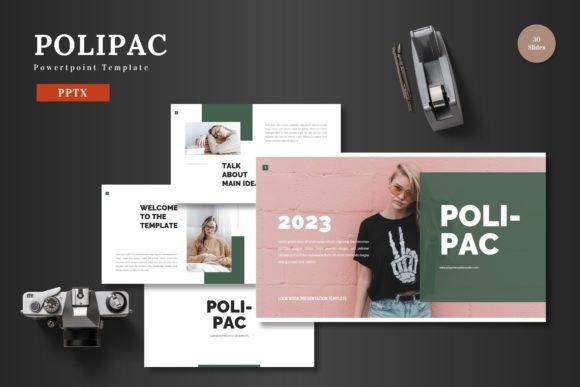
Furthermore, the offering includes five distinct premade color variations, each with 30 slides. This isn't just aesthetic choice; it's functional. You can select a color scheme that aligns with your brand identity, the mood of your topic, or your organization's visual guidelines before you even begin. Having 150 total slides across these schemes provides a vast library of starting points, from simple title slides to complex infographic layouts, all maintaining the same cohesive visual language.
Editable Assets: Working Within a Single Ecosystem
A defining feature of the Polipac Powerpoint Template is its commitment to a single-tool workflow. All elements—the handcrafted infographics, pixel-perfect illustrations, shape objects, and picture placeholders—are resizable and editable directly within PowerPoint. There is no need to export graphics to another software like Illustrator or Photoshop for basic adjustments.
This has profound implications for usability and compatibility. If you need to alter the color of an illustration to match a client's logo, you can do so with PowerPoint's native shape formatting tools. If a chart requires an additional data point, the infographic elements can be duplicated and rearranged without breaking their visual integrity. The drag-and-drop picture placeholder functionality exemplifies this practical approach: you simply drag your image file onto the placeholder, and it automatically sizes and fits into the designed frame. This eliminates the tedious process of manual cropping, resizing, and alignment for every visual asset.
Integrating Polipac Into Specific Workflows
The template's multipurpose nature means its integration point varies depending on your specific project. Let's examine a few common scenarios.
For a business pitch deck, your process likely starts with financial modeling, market analysis, and team bios. Once this substantive material is prepared, you face the challenge of making it compelling and digestible. With Polipac, you open the relevant PPTX file, navigate to its portfolio and gallery slide sections, and begin dropping in your team photos, product screenshots, and market graphs. The animated slides included in the set can be strategically used for revealing key metrics or introducing core team members, adding a layer of dynamic engagement without requiring you to build animations from scratch.
In an e-commerce or product promotion context, you may be aggregating content from multiple sources: product photography from a manufacturer, feature lists from engineering, and testimonials from customers. The template acts as a central organizer. You can use the section break slides to clearly demarcate different parts of your product story (e.g., Features, Benefits, Use Cases, Pricing). The resizable graphics allow you to create comparison tables or feature icon lists that visually break down complex product specifications, making them accessible to a non-technical audience.
For educators or bloggers creating instructional material, consistency aids learning. Using Polipac’s master-based design ensures that every lecture slide or blog-derived visual follows the same typographic hierarchy and color coding. This reduces cognitive load for the viewer, allowing them to focus on the information rather than adapting to new visual formats with each slide. The template’s structure also speeds up the creation of recurring content series, as the foundational design is already set and only the topical content needs to be swapped.
Long-Term Use and Organizational Efficiency
A quality PowerPoint template is not a one-project asset. Its long-term value lies in establishing a reusable visual standard. For a freelancer or small business owner, using Polipac across multiple client presentations builds a recognizable and professional personal brand. For a larger team, adopting a single template like Polipac as a company-wide resource ensures that all presentations, regardless of the department or individual creator, maintain a unified corporate image. This is crucial for external communications where brand perception is cumulative.
The included readme file with font and photo information supports this sustainable use. It provides the necessary details to maintain the template's quality beyond the initial project, such as knowing which fonts to install for perfect typographic matching or understanding the image resolution guidelines for the placeholders. This attention to supporting documentation speaks to a template designed for real-world, ongoing implementation, not just a one-off download.
Ultimately, the Polipac Powerpoint Template is a process accelerator. It interacts with your existing content, your brand assets, and your narrative goals by providing a ready-made, editable container. It reduces the friction between having a message and delivering it visually. By handling the universal design challenges—layout, color harmony, graphic consistency—it allows you, the creator, to concentrate on what makes your presentation unique: your content, your insight, and your voice. The final step, presenting your slides to the world, becomes a confident delivery of a polished product, built through a streamlined and practical workflow.