Violena: A Versatile Template for Google Slides Presentations
In a world where visual communication is paramount, a well-designed presentation can be the difference between a forgotten pitch and a successful partnership. For many, creating such a presentation from scratch is a daunting task, requiring hours of design work and a skillset they may not possess. This is where the Violena - Google Slide Template enters the scene, offering a structured, aesthetically pleasing foundation upon which anyone can build their story.
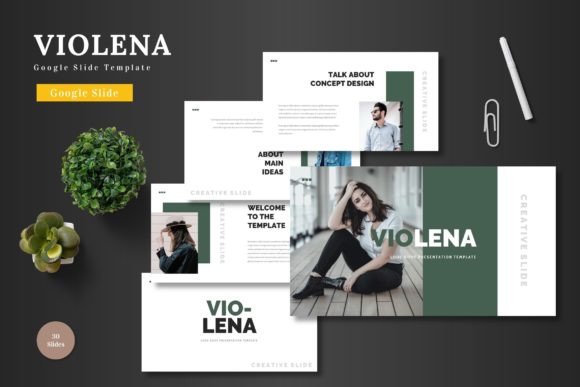
Essentially, the Violena template is a pre-designed set of slides within Google Slides. It provides a cohesive visual framework—clean layouts, scalable graphics, and a colorful palette—that users can populate with their own content. Its description as "multipurpose" is key; it's engineered to be suitable for a Business pitch, an E-commerce product launch, an educational lecture, or a personal project portfolio. The core promise is quality and efficiency: you maintain a professional standard while saving significant time and creative energy.
Why Different Audiences See Value in a Template Like Violena
The appeal of a template is not universal; it varies dramatically based on a person's role, skill level, and immediate goals. A freelance graphic designer might evaluate its editable graphics, while a startup founder prioritizes the speed of deployment. Recognizing these differing priorities helps in understanding whether Violena aligns with your specific needs.
For the beginner or hobbyist, the primary concern is often ease of use and a fear of "breaking" the design. Violena addresses this by being fully editable within Google Slides itself—no additional software is required. The process is straightforward: input your text, replace images using drag-and-drop placeholders, and change colors from a predefined palette. This sandboxed creativity reduces anxiety and allows newcomers to focus on their message rather than technical tool mastery. A hobbyist crafting a presentation for a community club, for example, can achieve a polished result without prior design experience.
Professionals, entrepreneurs, and small business owners typically operate under time constraints and have a sharp eye for commercial value. Their evaluation of Violena leans heavily towards reliability, presentation impact, and long-term usefulness. The template’s 150 total slides, divided into clear sections with break slides, offer a comprehensive toolkit for various narrative flows. The inclusion of an animated slide adds a dynamic element that can emphasize key points during a Pitch Deck. For a marketer launching a new product, the ready-made portfolio and gallery slides mean they can showcase visuals immediately, accelerating the go-to-market process. The quality of "pixel-perfect illustrations" and resizable graphics ensures their brand appears consistent and sharp, a non-negotiable in business contexts.
Creators, Educators, and Freelancers: Flexibility and Creative Control
This group often balances creativity with practical constraints. A creator or blogger might use Violena to present a content strategy or a yearly review to their audience. They value the template’s flexibility—the five color variations (with 30 slides per color) and handcrafted infographics allow them to adapt the look to their brand's tone. Since all elements are editable from a Google Slides shape, they can tweak infographics to better represent their unique data, moving beyond a generic template feel.
Educators and trainers have distinct priorities: clarity and learning value. A clean, scalable template helps structure complex information into digestible segments. The section breaks and master slide-based design ensure a logical flow throughout a lecture series. The ability to easily swap in relevant images into placeholder areas means they can quickly update case studies or visual examples for different classes, making the template a reusable asset across semesters.
For freelancers and publishers, the evaluation might include both creative and commercial angles. A freelance consultant needs to present proposals that look invested and trustworthy; Violena’s professional aesthetic serves that need without the cost of hiring a designer. A digital publisher might use it to create compelling visual summaries of reports or articles. The fact that the main file includes five separate PPTX files (each for a color scheme) in widescreen format adds to its utility for clients who may request different file types, highlighting its adaptability.
Identifying If Violena Matches Your Goals and Project Type
Making a decision involves aligning the template's features with your personal or professional scenario. Consider your primary hurdle. Is it speed? The Violena - Google Slide Template’s ready-to-use structure eliminates blank-page paralysis. Is it quality consistency? The master slide foundation and editable but professionally crafted graphics provide a safety net against design inconsistency.
Project type is a major filter. If you are working on a one-off, personal presentation with minimal visual demands, the full suite of 150 slides and five colors might be more than you need. However, for a recurring need—like quarterly business reports, ongoing client pitches, or a series of training modules—the template's depth and reusable components offer significant long-term value. The included readme file with font and photo information also supports a smoother setup process, which is particularly helpful for those managing multiple projects.
Ultimately, the Violena template is a bridge. It bridges the gap between having a message and presenting it with visual confidence. It serves not by imposing a rigid style, but by offering a clean, colorful, and completely editable canvas. Whether you are a seasoned professional needing to streamline workflow, a beginner seeking a guided path to a good design, or a creator wanting a solid base for your ideas, its value lies in its multipurpose design and commitment to user-centric editing. By allowing you to focus entirely on your content, it helps you present your slides to the world with a clear, confident, and visually coherent voice.